










- App Download FAQs
- Customer General FAQs
- Plan / Pricing and Billing FAQs
- Technical FAQs
- Nuke Render
App Download FAQs
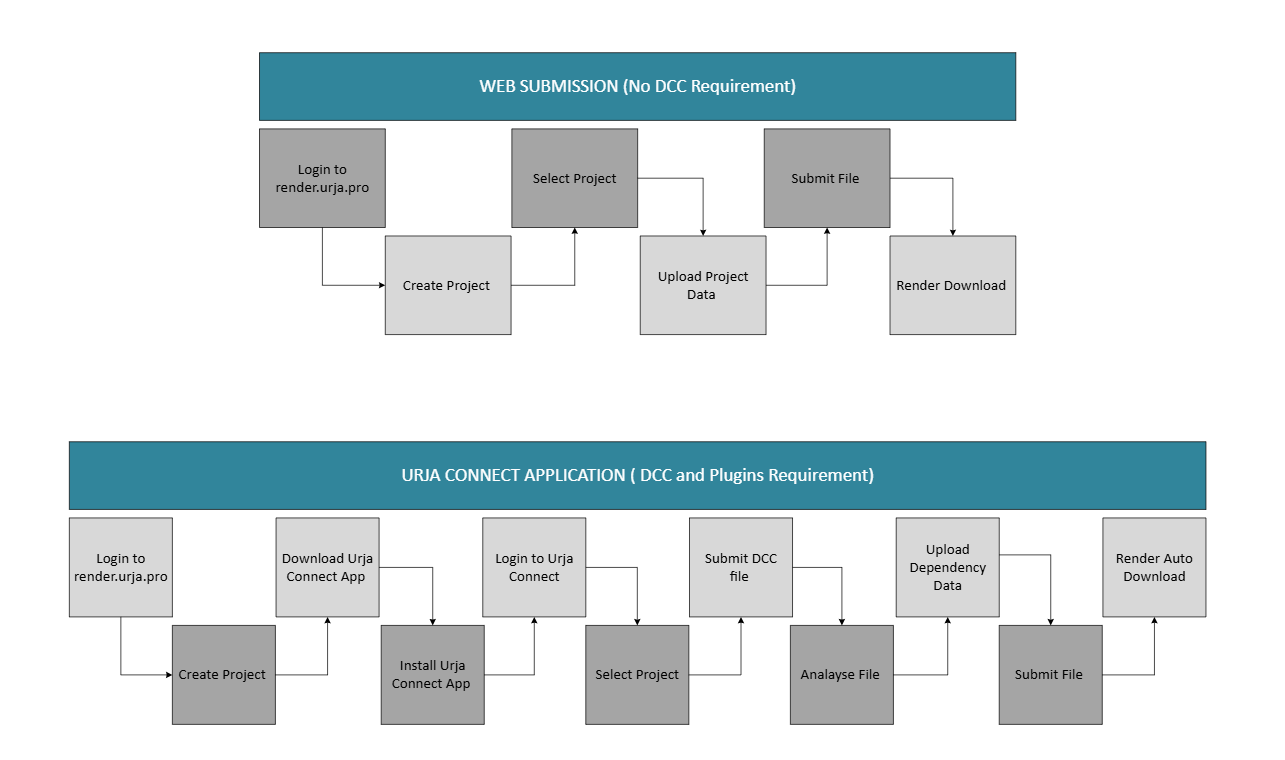
How can I Start Rendering with just few steps?
Download the Urja Renderfarm Connect app as per your OS platform.
Where can I install this application file?
Install in your local systems /Thin client or Laptop having the 3D Application. Once installed successfully, please configure IP address in the Urja Connect.
Where can I get the IP address?
Urja will send an automated email on your registered email ID.
Where can I get the yotta application information to start render?
Open 3D app > go to the preferences and switch on the Urja plugin from plugin manager.
Location of app in local system after installation?
Once Urja plugin is added successfully then it will show on menu taskbar of application.
The Urja Render Support System
Structured across three specialized support levels to ensure efficient issue resolution and smooth render operations.

L2 – Senior Render Wranglers
- Advanced operational and scene-level support
- Scene and file-related issue analysis
- Debugging and advanced troubleshooting
- Plugin compatibility and configuration support
- Render node monitoring and management
- Job prioritization and queue optimization
L3 – IT & Pipeline Technical Directors
- Infrastructure, pipeline, and system-level support
- Application and software support
- Network and server-related incidents
- Application profiling and optimization
- Pipeline integration and workflow alignment
- Data transfer and server connectivity issues
L4 – Product & Platform Team
- Account, billing, and product-level escalations
- Account and billing-related support
- Service availability and downtime management
- Product updates and feature enhancements
- Issue escalation based on complexity and impact
- Automation and platform customization requirements
Offline & Custom Pipeline Support
Urja supports extended workflows beyond standard rendering, enabling advanced production pipelines:
Every studio operates within a unique production pipeline, with custom workflows, tools, plugins, and delivery requirements. To ensure seamless integration, the Urja Renderfarm Support team collaborates closely during the Proof of Concept (POC) stage with key technical stakeholders such as Senior Lighting Artists, Render Wranglers, and Technical Directors. This collaborative approach enables us to evaluate any specific pipeline requirements, including proprietary tools, custom plugins, scripts, or workflow dependencies that may be critical to your final output. Our objective is to ensure a scalable, production-ready rendering environment that delivers optimal performance and cost efficiency from the outset. For the POC process, we recommend submitting either a single scene file or cached project package not exceeding 20 GB in size.
As part of the onboarding process, our team conducts rendering and optimization tests at no additional cost using the complimentary 50 credits provided upon sign-up. Based on the results, we may further refine the setup by adapting existing workflows or implementing additional tools, plugins, gizmos, or automation layers required by your production pipeline. In cases where new macro tools or custom pipeline integrations need to be developed, our Support and Technical Director teams will provide clear timelines based on the scope and complexity of the requirements. Since every production environment is unique, implementation timelines may vary accordingly.
We understand that production schedules are often highly time sensitive. Our Support and Technical teams are committed to delivering responsive integration assistance and ensuring that any customized requirements are implemented as efficiently as possible, enabling your artists to focus on creating exceptional work.
Register on Urja Renderfarm
Ignite Your Creativity with Limitless Compute Power and Studio-Grade Support.